The Forwarding Analysis - By Interaction report provides a detailed listing of messages forwarded by the selected agent with columns for each type of forward. This is a drill-through report from the By Topic report, and shows activity only for the selected agent and the selected topic. It shows the number of forwarded messages by the agent for the selected topic, which helps to determine whether messages are not being properly queued and must be re-queued by agents. It also highlights agents that might be putting difficult questions back into the queue that they don't want to handle.
Clicking on a single interaction will open iService with that interaction selected (iService login is required).
Setup Required
There is no setup required. The report uses standard iService audit trail information.
Parameter Selection
This is a drill-through report from the Forwarding Analysis by Topic report. The parameters are obtained from the parent report.
Report Example
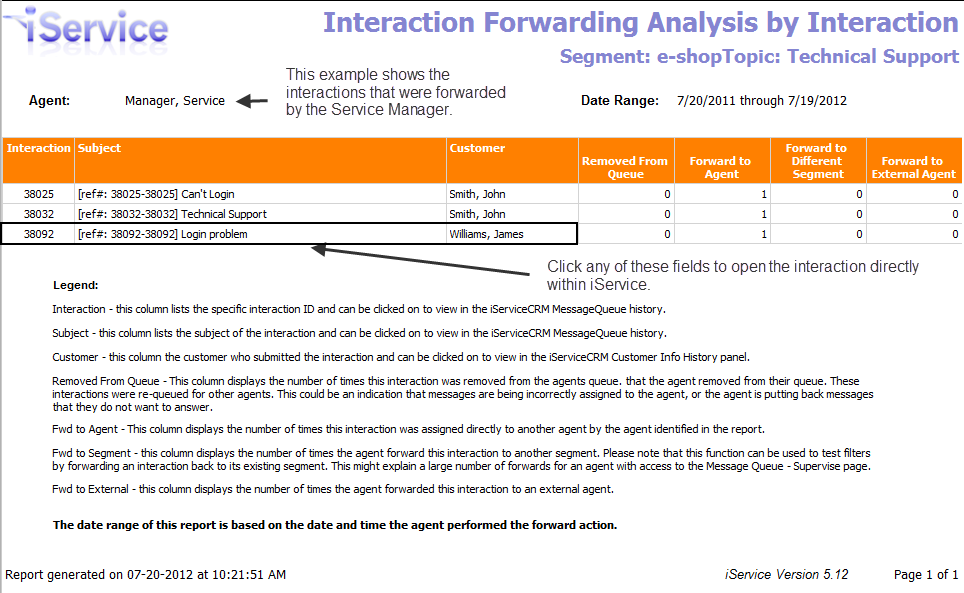
Click to expand
Report Legend:
Interaction - This column lists the specific interaction ID and can be clicked on to view in the iServiceCRM Message Queue history.
Subject - This column lists the subject of the interaction and can be clicked on to view in the iServiceCRM Message Queue history.
Customer - This column lists the customer who submitted the interaction and can be clicked on the view in the iServiceCRM Customer Info History panel.
Removed From Queue - This column displays the number of times this interaction was removed from the agents queue that the agent removed from their queue. These interactions were re-queued for other agents. This could be an indication that messages are being incorrectly assigned to the agent, or the agent is putting back messages that they do not want to answer.
Forward to Agent - This column displays the number of times this interaction was assigned directly to another agent by the agent identified in the report.
Forward to Segment - This column displays the number of times the agent forward this interaction to another segment. Please note that this function can be used to test filters by forwarding an interaction back to its existing segment. This might explain a large number of forwards for an agent with access to the Message Queue - Supervise page.
Forward to External - This column displays the number of times the agent forwarded this interaction to an external agent.
