The agent response time report shows a breakdown of the time required to resolve interactions. It can be run for messages (Customer e-mails, tickets, and AAQ forms) or chats, and can group by agents or topics. It provides insight into how long it takes to get messages assigned agents, and how long agents take to provide the response.
Setup Required
There is no setup required. The report uses standard iService interaction information.
Parameter Selection
Select the segment and then the topics within that segment to be included.
Select the type of responses to include in the report (Chat or Messages).
Specify the report time-frame.
Select whether to group by agent or topic.
Report Examples
Message response time grouped by Agent
When grouped by agent, expanding an agent row shows a breakdown of that agent's messages by topic.
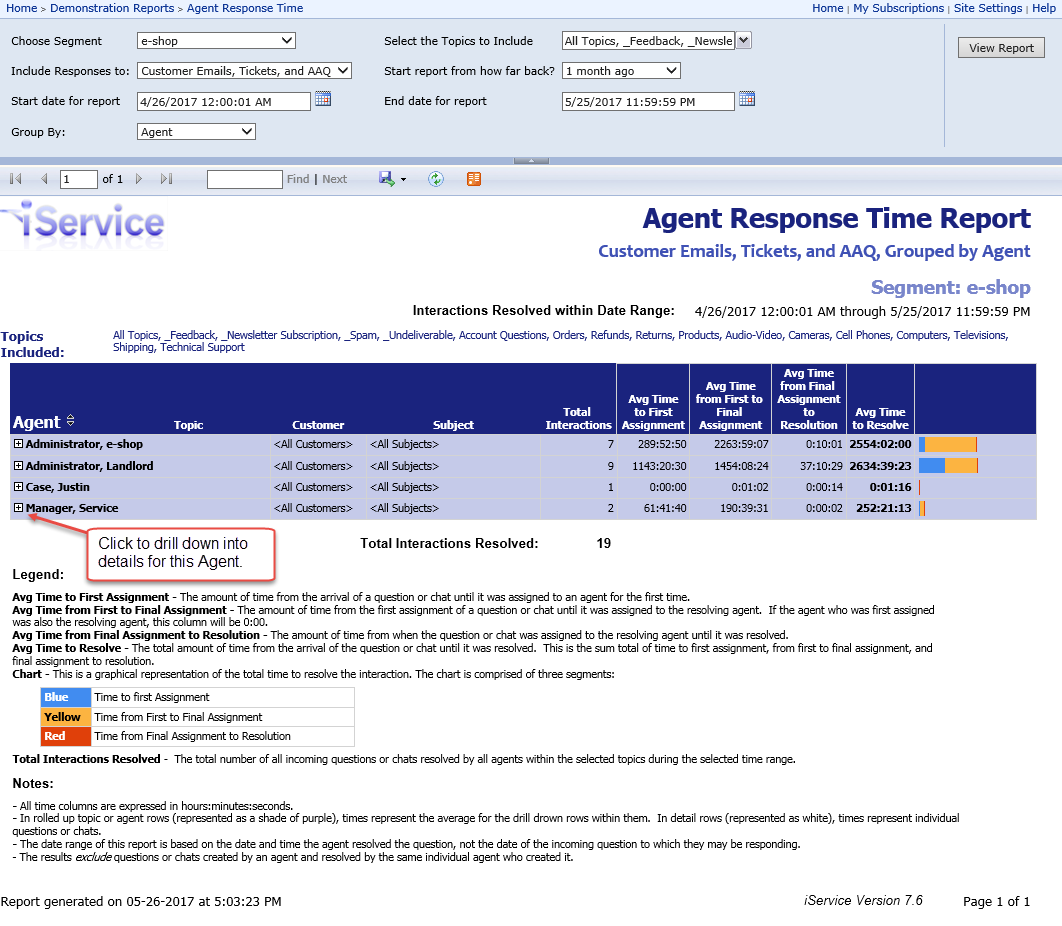
Click to enlarge
Report Legend:
Average Time to First Assignment - The amount of time from the arrival of a question or until it was assigned to an agent for the first time.
Average Time from First to Final Assignment - The amount of time from the first assignment of a question or chat until it was assigned to the resolving agent. If the agent who was first assigned was also the resolving agent, this column will be 0:00.
Average Time from Final Assignment to Resolution - The amount of time from when the question or chat was assigned to the resolving agent until it was resolved.
Average Time to Resolve - The total amount of time from the arrival of the question or chat until it was resolved. This is the sum total of time to first assignment, from first to final assignment, and final assignment to resolution.
Chart - This is a graphical representation of the total time to resolve the interaction. The chart is comprised of three segments:
Blue |
Time to first Assignment |
Yellow |
Time from First to Final Assignment |
Red |
Time from Final Assignment to Resolution |
Total Interactions Resolved - The total number of all incoming questions or chats resolved by all agents within the selected topics during the selected time range.
Notes:
- All time columns are expressed in hours:minutes:seconds.
- In rolled up topic or agent rows (represented as a shad of purple), times represent the average for the drill down rows within them. In detail rows (represented as white), times represent individual questions or chats.
- The date range of this report is based on the date and time the agent resolved the question, not the date of the incoming question to which they may be responding.
- The results exclude questions or chats created by an agent and resolved by the same individual agent who created it.
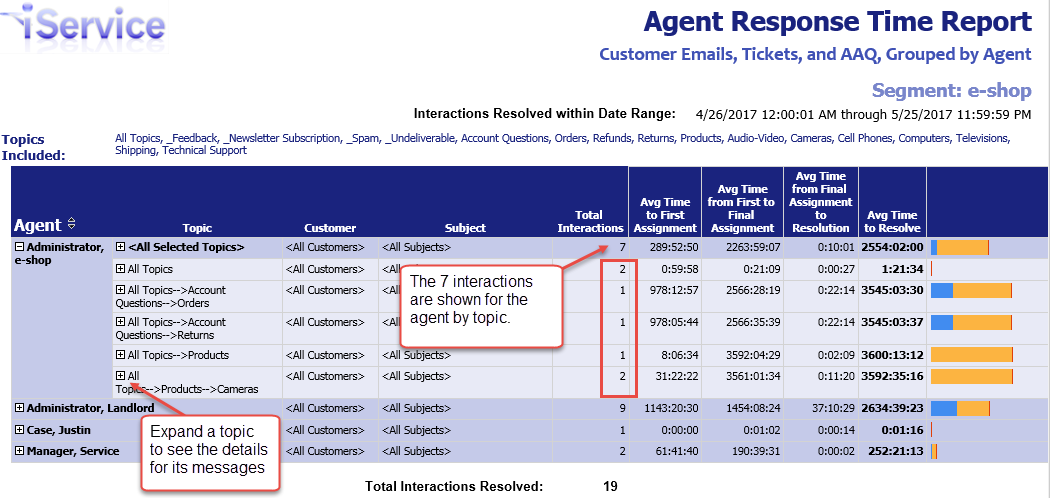
Expand an agent to see their responses by topic.
Click to enlarge
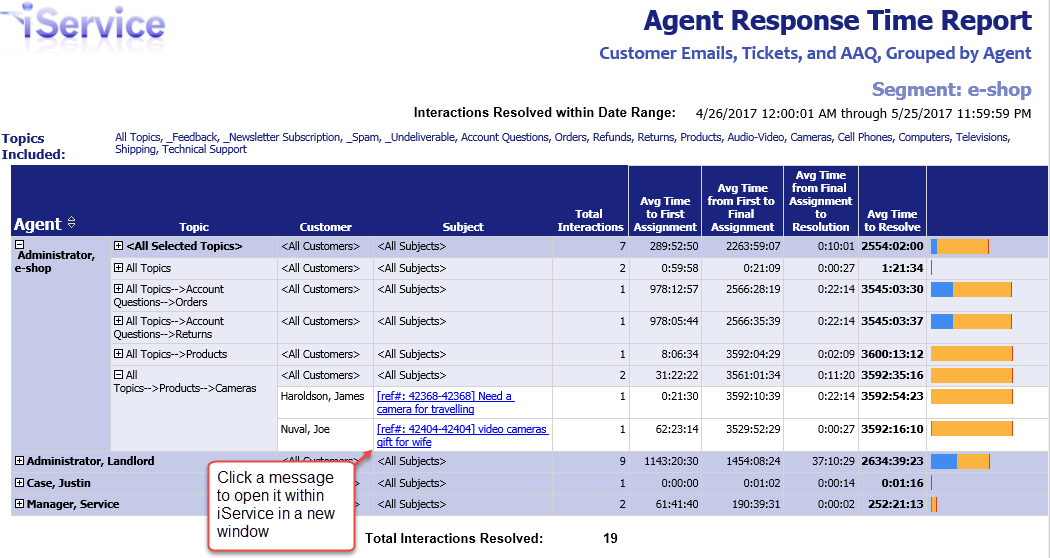
Expand a topic to see its responses.
Click to enlarge
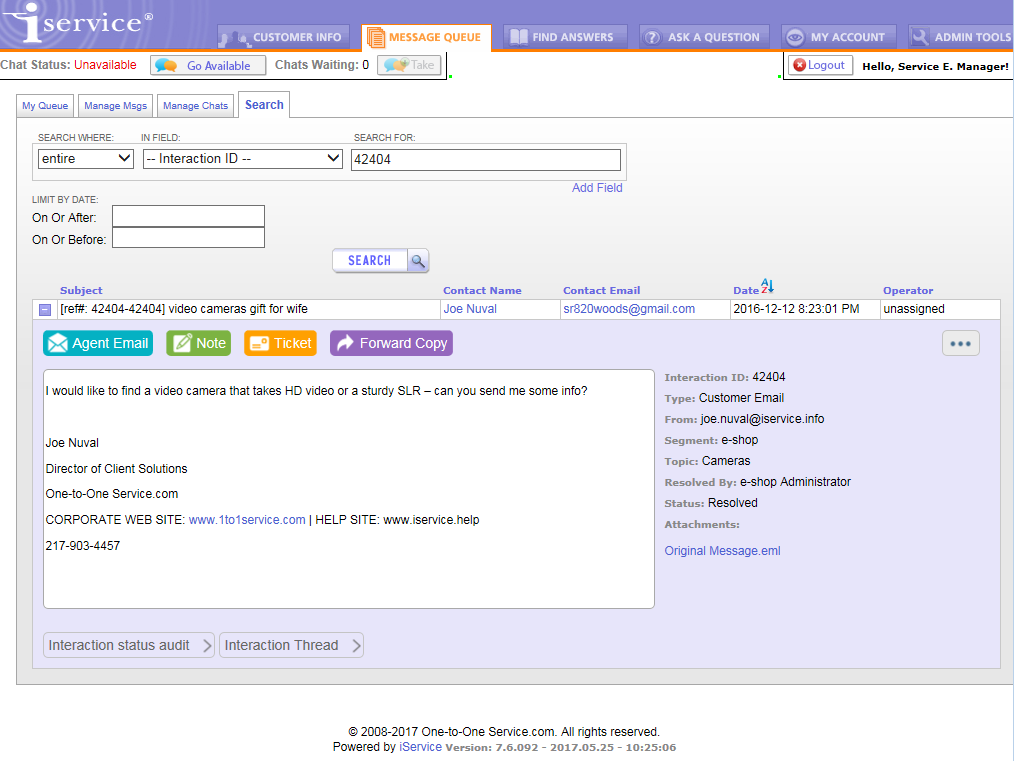
Click a subject line to see the message in a new window in iService.
Click to enlarge
Message response time grouped by Topic
This report is identical to the grouped by Agent report, but has a different drill through order. When grouped by topic, expanding a topic row shows a breakdown of that topic's messages by agent.
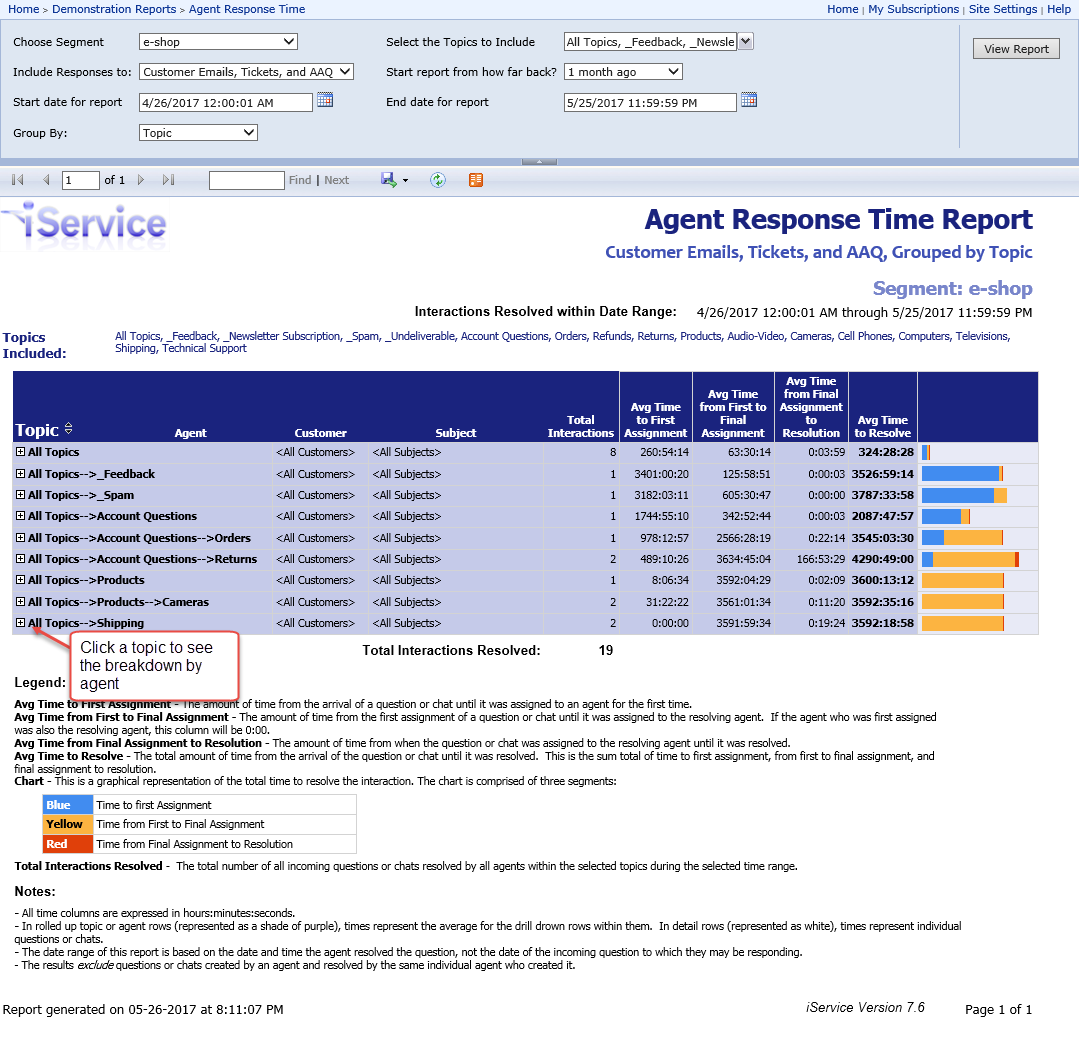
Click to enlarge
Report Legend:
Average Time to First Assignment - The amount of time from the arrival of a question or chat until it was assigned to an agent for the first time.
Average Time from First to Final Assignment - The amount of time from the first assignment of a question or chat until it was assigned to the resolving agent. If the agent who was first assigned was also the resolving agent, this column will be 0:00.
Average Time from Final Assignment to Resolution - The amount of time from when the question or chat was assigned to the resolving agent until it was resolved.
Average Time to Resolve - The total amount of time from the arrival of the question or chat until it was resolved. This is the sum total of time to first assignment, from first to final assignment, and final assignment to resolution.
Chart - This is a graphical representation of the total time to resolve the interaction. The chart is comprised of three segments:
Blue |
Time to first Assignment |
Yellow |
Time from First to Final Assignment |
Red |
Time from Final Assignment to Resolution |
Total Interactions Resolved - The total number of all incoming questions or chats resolved by all agents within the selected topics during the selected time range.
Notes:
- All time columns are expressed in hours:minutes:seconds.
- In rolled up topic or agent rows (represented as a shade of purple), times represent the average for the drill down rows within them. In detail rows (represented as white), times represent individual questions or chats.
- The date range of this report is based on the date and time the agent resolved the question, not the date of the incoming question to which they may be responding.
- The results exclude questions or chats created by an agent and resolved by the same individual agent who created it.
Expand a topic to see the count by agent.
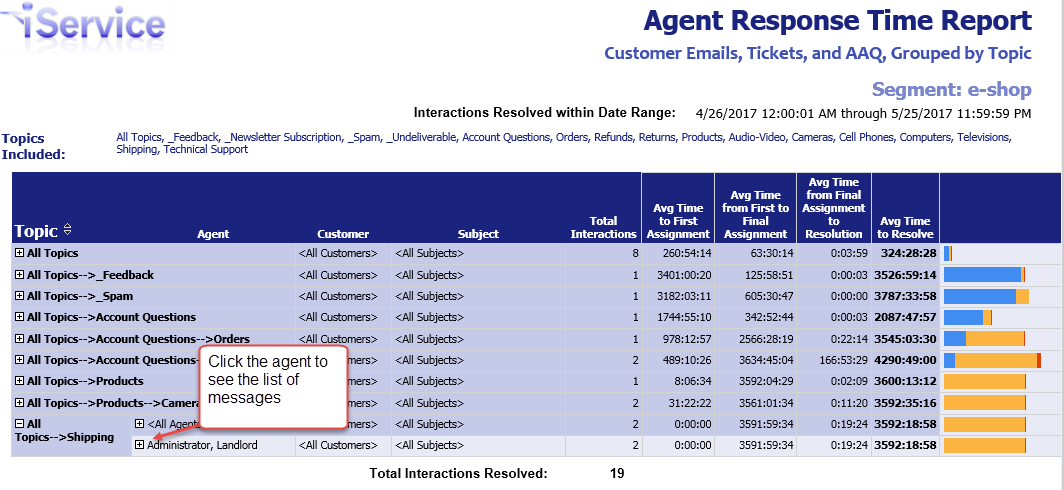
Click to enlarge
Click a message to view it in a new browser window.
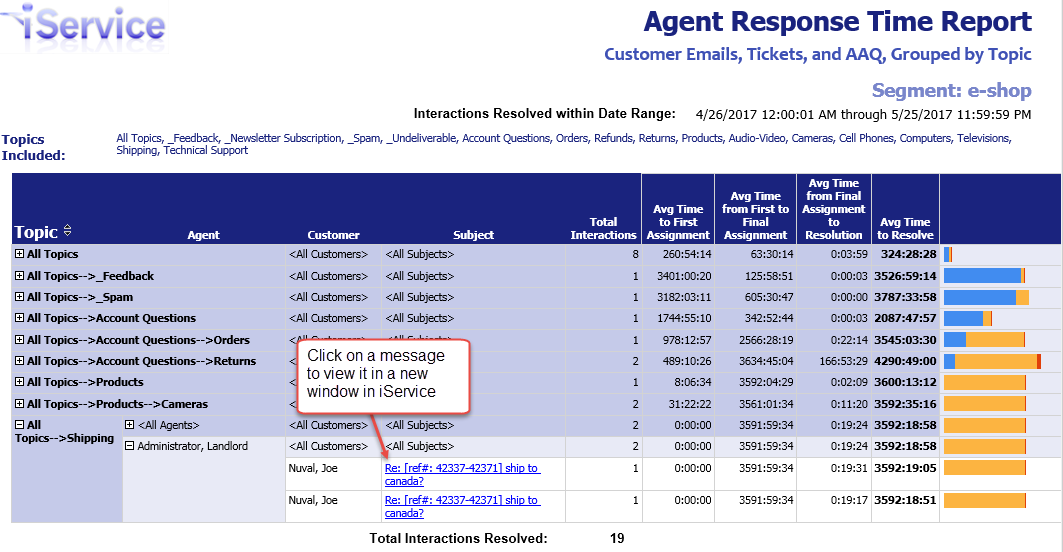
Click to enlarge
