You can deploy iService chat in many ways, but the most common are as a link on a web page or via a URL that you provide directly to your customer. iService chatforms are HTML web pages that use web sockets to provide real-time communication. Both live chat and Chatbot forms are responsive web pages that can be loaded directly in a browser on desktop to mobile.
The chat configuration tool generates a plug-in .zip file for WordPress sites, and a script file that will run on any HTML web page. The standalone option provides a URL that you can email to a customer or open from a link on any web page. All of these deployments use the exact same chat configuration file and underlying chat form.
Install details are organized below base on common deployment needs. iService includes custom form variables that give you complete control over how you deploy your forms. Using agent availability tracking, you can provide a real-time display of agent availability or only offer chat when agents are online and set as available for chat.
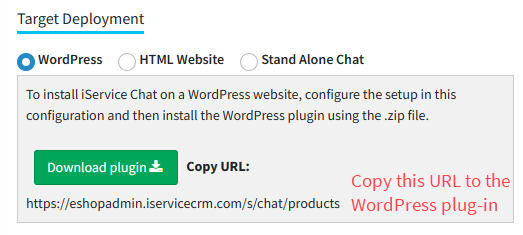
WordPress is one of the most popular content management systems for building websites. iService chat can be added to a WordPress site with the iService Chat Plugin, which can be downloaded from the settings page as shown below.
After you create your configuration, the plug-in and URL to enter within your WordPress settings will appear as below.
Deploying to WordPress
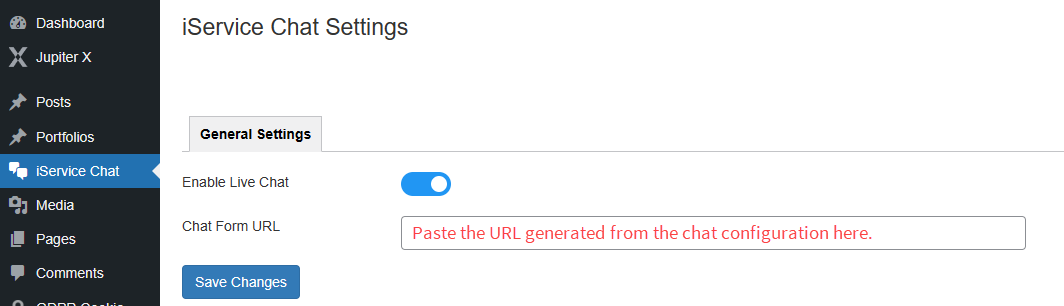
Click the Download plugin button to download the iService Chat Plug-in that you will install on your WordPress site. After you install the plug-in on WordPress, an iService Chat settings menu will appear in your WordPress admin page. Copy the URL provided (see image above) to the settings page as shown below.
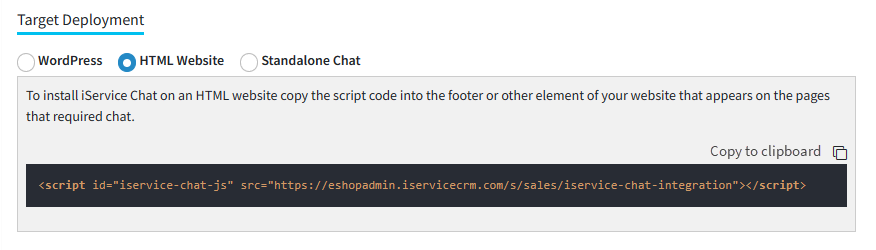
iService chat can be integrated into any HTML website, regardless of the content management system used. The HTML Website deployment option generates a <script> tag that you can copy into any page that requires iService chat. The most common method is to insert the script into a footer that is automatically included in the desired pages.
When you create the chat configuration with HTML Website as the target, the script will appear similar to the example below. When run on your web page, the script will create the iFrame that contains the chat button. The script includes the Chat ID, so you can install different chat forms on different pages of your website as needed.
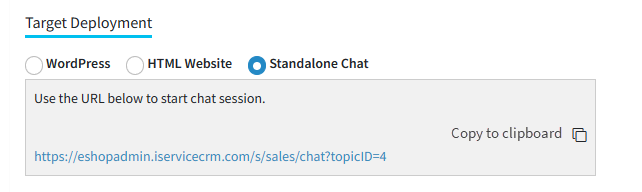
This option provides a URL that can be loaded directly by a browser. Use this option to create a link for email footers, to invite a customer to a chat, or to open your customer chat window as it's own page (rather than an iFrame within a website). You can use the same configuration but a different topic by changing the topicID to any topic in your tenant.
Configuring a Standalone Chat Form
You can use custom iService form code to manage the display of buttons that open standalone chat forms. The $if -chat variable is used to determine agent availability and can be used to make custom deployments. See The $if -chat chapter for more details.
 You can deploy iService chat in many ways, but the most common are as a link on a web page or via a URL that you provide directly to your customer. iService chatforms are HTML web pages that use web sockets to provide real-time communication. Both live chat and Chatbot forms are responsive web pages that can be loaded directly in a browser on desktop to mobile.