Core Technology & Architecture
The VectorStore acts as iService's central semantic repository, translating raw text into conceptual meaning to power advanced AI features.
•The Embedding Model: Text is converted into a 256-dimensional numerical format using OpenAI’s text-embedding-3-large model.
•Data Structure: Each record in the database is lightweight, containing only the 256-dimension vector and a reference link back to the source interaction or article. This layout keeps storage efficient and lookups incredibly fast.
•The Match Mechanism: Rather than hunting for exact keywords, the system uses cosine similarity to compare the math behind two vectors. It measures the angle between them to calculate how close they are in meaning, easily catching synonyms, paraphrases, and varied phrasing.
Ingestion Pipeline & Lifecycle
The VectorStore continuously updates itself as data flows through the platform. Administrators can manage this pipeline via the AI Embeddings admin page, which tracks processing queues, history, and system status.
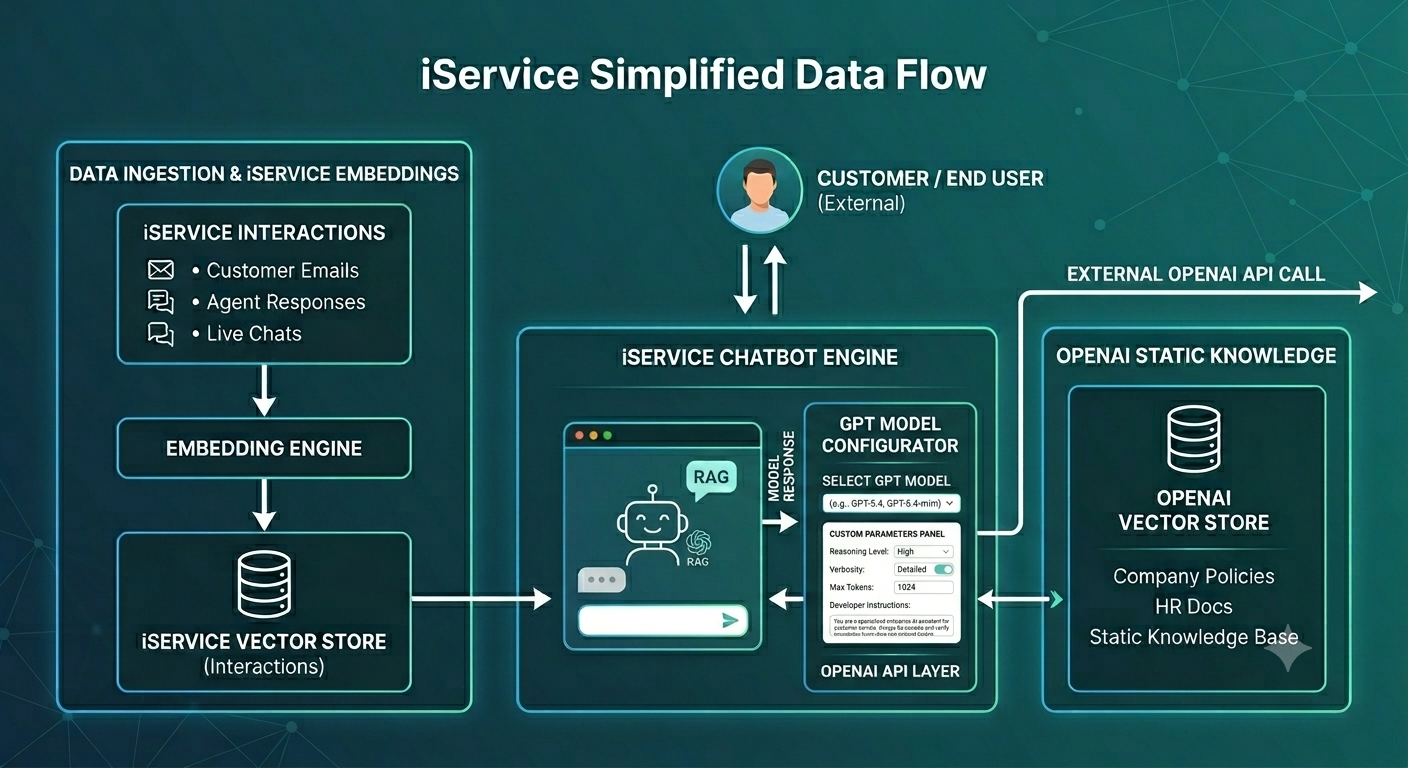
•Immutable Interactions (non-KB article): Customer emails, agent responses, and internal notes are embedded a single time at creation. Because these communications never change after the fact, they are written to the VectorStore once with their unique Interaction ID and require no further updates.
•Dynamic KB Articles: Knowledge Base articles are also embedded at creation, but they are unique because they are living documents. Every time an author saves an update to an article, the system re-runs the embedding pipeline to overwrite and refresh its semantic index (either as a whole or split into sections depending on configuration).
Application & AI Features
Once content is vectorized, iService leverages it across three primary functional areas:
Unified Semantic Search
The system generates a vector for the user's search query on the fly, matching it against the database to surface conceptually relevant results. Applies to: Cross-object searches spanning both help articles and past communications.
Example queries: "customer requested updated paperwork" or "how to handle accessorial charges."
Conversational AI Grounding (RAG)
When a customer service agent asks the AI a question, the VectorStore handles the heavy lifting behind the scenes using a Retrieval-Augmented Generation (RAG) workflow:
Step |
Action |
Description |
|---|---|---|
1. Retrieve |
Semantic Search |
Uses cosine similarity to pull the most relevant historical interactions or articles. |
2. Ground |
Context Injection |
Feeds the retrieved text directly into the AI model as factual grounding data. |
3. Respond |
Synthesized Answer |
The AI generates an accurate response based only on that context, neutralizing hallucinations. |
4. Anchor |
Thread Continuity |
Keeps follow-up questions tied to that same retrieved context until the topic shifts. |
Platform Growth & Future Capabilities
The underlying vector infrastructure is built to scale beyond search and chat. The roadmap includes deploying these same semantic layers to power automated ticket routing, smart classification, and proactive content summarization.
