 The AI Embeddings tab on the Server Process Management page controls the background process that generates and maintains vector embeddings for your iService content. These embeddings power AI features such as semantic search and intelligent response suggestions. Navigate to Admin > Tools > Server Process Management and click the AI Embeddings tab.
How AI Embeddings Work
iService uses an AI model to convert interaction content into vector embeddings — numerical representations that capture the semantic meaning of text. When content is created or modified, the corresponding embedding becomes stale and must be recomputed. The AI Embeddings process automatically detects stale embeddings and recomputes them every minute.
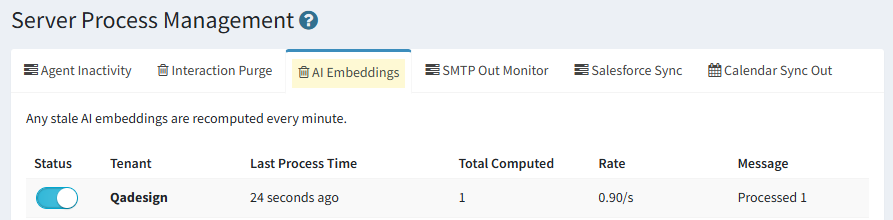
Enabling or Disabling the Embedding Process
The Status column contains a toggle switch that turns the embedding process on or off for your tenant.
On — The process actively monitors for stale embeddings and recomputes them on each cycle (every minute). When an interaction requires embedding, the value for wantVector is changed from 0 to 1.
Off — No embeddings are generated or updated. Existing embeddings remain in place but will become stale as content changes. AI features that rely on embeddings may return less relevant results while the process is disabled.
Note: Disabling the embedding process does not delete existing embeddings. When re-enabled, the process will detect and recompute any embeddings that became stale while it was off.
Process Status Table
The status table displays the current state of the embedding process:
Column |
Description |
Status |
Toggle switch to enable or disable the embedding process. |
Tenant |
The name of the iService tenant this process is running for. |
Last Process Time |
How recently the embedding process last ran. Under normal operation this updates every minute. |
Total Computed |
The total number of embeddings computed during the current processing cycle. |
Rate |
The processing speed in embeddings per second (e.g., 0.90/s). This reflects the throughput of the AI model and can vary depending on content length and server load. |
Message |
A summary of the most recent processing cycle (e.g., Processed 1 indicates one embedding was generated or updated on the last run). |
Monitoring the Process
•Last Process Time should update approximately every minute. If the timestamp stops advancing, the background process may have stalled and may require a server-level restart.
•Total Computed will be higher during initial setup or after a bulk content import, as the process works through a backlog of unembedded content. During normal operation, this number reflects only the incremental changes since the last cycle.
•Rate provides a useful indicator of processing throughput. A sustained low rate during a large backlog may indicate resource constraints on the server.
•Message summarizes each cycle's output. A message of Processed 0 means the cycle ran successfully but found no stale embeddings to recompute.
