The primary considerations when creating a live chat form are the agents that will be interacting (topic Selection) and how your customers will find the chat form (target deployment). These are specified in the Topic Selection and Target Deployment parameters of your chat form. The chat settings page also provides access to reCAPTCHA settings, which are used to prevent automated submission of your chat forms.
Click the New Chat Configuration button to begin configuring your chat form. There are two types of chat forms, live chat and Chatbot. Live chat and Chatbots use the same Chat window and are styled using the same configurations.
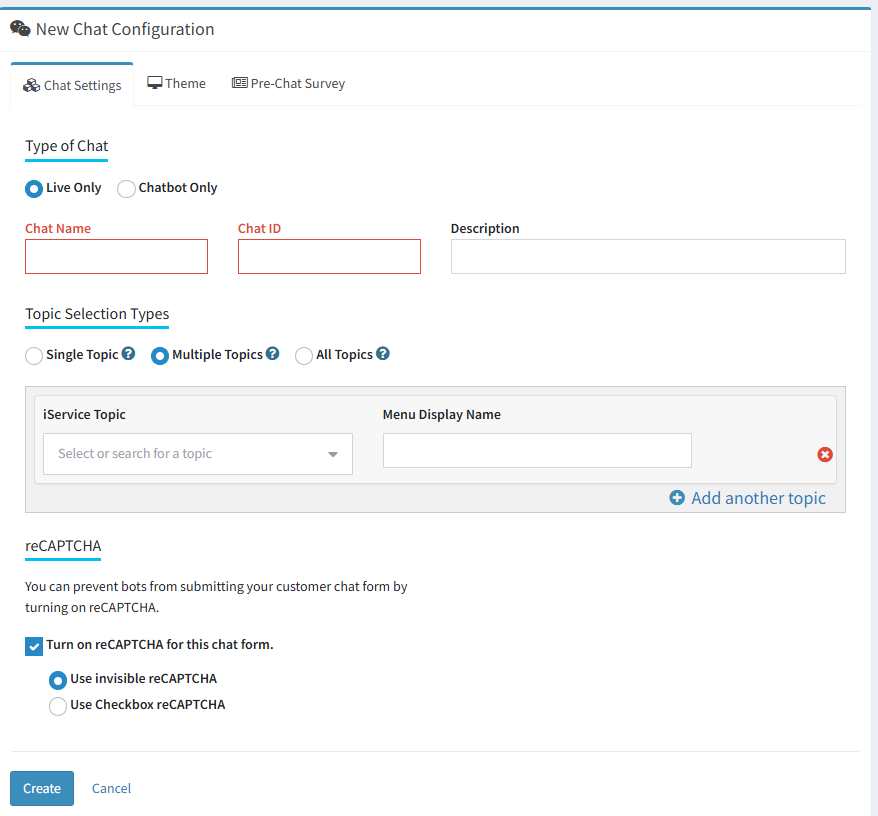
There are six values to set on a main chat configuration for a Live Chat: Chat Name, Chat ID, Description, Topic Selection Type, Menu Link, and reCAPTCHA .
The Chat Settings Page
a
These settings are explained in more detail below.
The Chat ID is used to identify the chat form and is part of the URL of the form. An example of a chat URL with a Chat ID of sales is shown below.
https://tenant.iservicecrm.com/s/sales/chat
Since the ID is part of the URL, special characters and spaces are not allowed in the ID. Use an ID that is short but descriptive such as sales or support. The IDs from all of your configurations, including workflow or other configuration settings, must be unique to your tenant. The settings page will display an error notifying you if the ID is already used or contains invalid characters.
Every interaction within iService, including live chat, is associated with a topic. The chat topic determines the agents available to chat and should be chosen carefully to ensure you have agents available for the types of questions customers will ask. There are three options for setting the topic, each of which has its own configuration options.
Single Topic
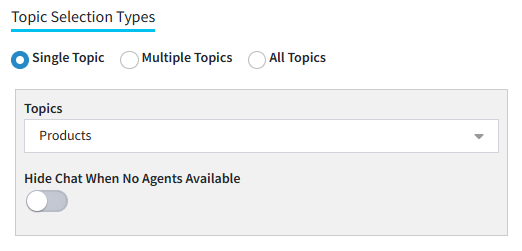
If you only have one team of agents that support chat (e.g., Sales or Support), you can use a single topic configuration. This configuration allows the customer to skip the topic selection menu when they submit their chat request. Because the topic is already specified, you have the option to hide the chat button when there are no agents available for the specified topic. This configuration is appropriate when every agent that provides chat support has the skills for the topic chosen.
A single topic chat configuration
Hide Chat When No Agents Available
The single topic setup allows you to hide the chat button from your website if there are no agents available to chat. For the chat button to appear or your website when this is on, you must have agents logged into iService that 1) have the chat.access access right, 2) are logged in and set as available to chat, and 3) have the segment access and skills for the chosen topic. When this conditions is not met, the chat button is hidden.
The hide chat button is only available when the single topic option is chosen, and is only relevant for WordPress or HTML deployments. The Standalone chat form is loaded independently and is not directly associated with a Chat with us button that can be automatically hidden.
Multiple Topics
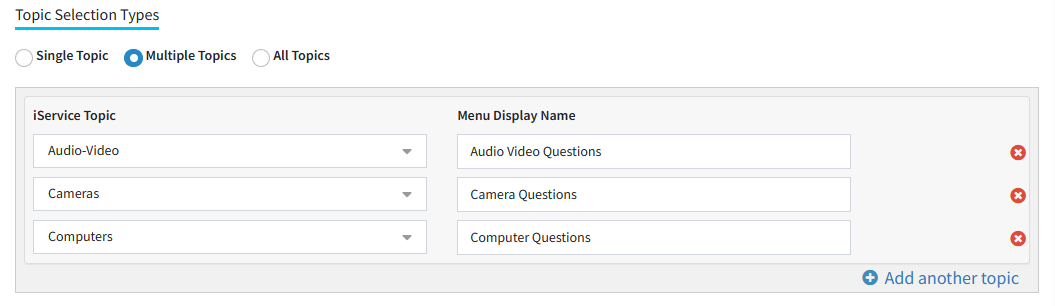
This option allow you to create a custom menu that includes custom names for the topics selected. After selecting a topic, provide the text to display in the topic selection menu. This is a common approach when your tenant has many topics, and only a small number of them are appropriate for customer chat. This allows you to offer a single Chat with us button, and customers can choose the appropriate team of agents based on the topic.
Configuring multiple topics for chat
All Topics
The All Topics option will display the standard topic menu to the customer, but will only display the public topics for segments configured in the Websites page. There are no additional options to set with this configuration other than choosing the All Topics radio button. This options is usually only appropriate if you have a small number of topics that have customer friendly names.
In larger organizations, you might include an option for agents to obtain support via an integrated chat form within iService. This option is used when technical support or other internal support operations use iService chat to assist agents. When the checkbox is selected, a link to the chat is added to the left navigation menu.
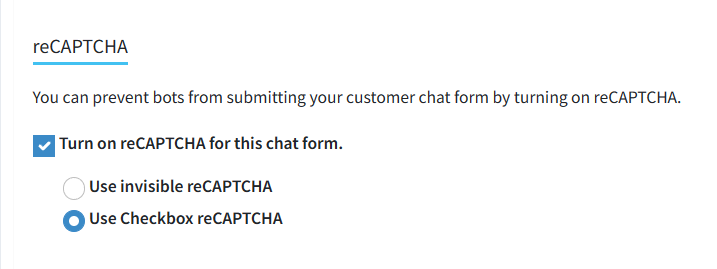
iService includes built-in support for reCAPTCHA v2 (invisible and checkbox). The reCAPTCHA is enabled by default, but can be disabled if needed. Users will not see the reCAPTCHA challenge on their screen unless they are determined to be suspicious.
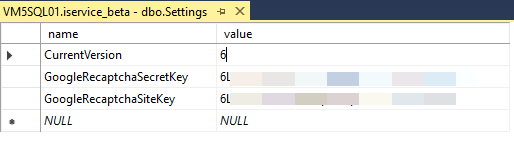
If you operate your own iService installation, you must add your site and secret keys to your master database to enable reCAPTCHA.
You can create reCAPTCHA keys at https://www.google.com/recaptcha/admin. Create a v2 Invisible key and then add the secret and site keys to your master database as
shown below.
Adding site and secret keys to the master DB settings table
 Topic Selection Types