The Details tab lists all of the details for the account, which includes standard account information and custom properties defined for each segment.
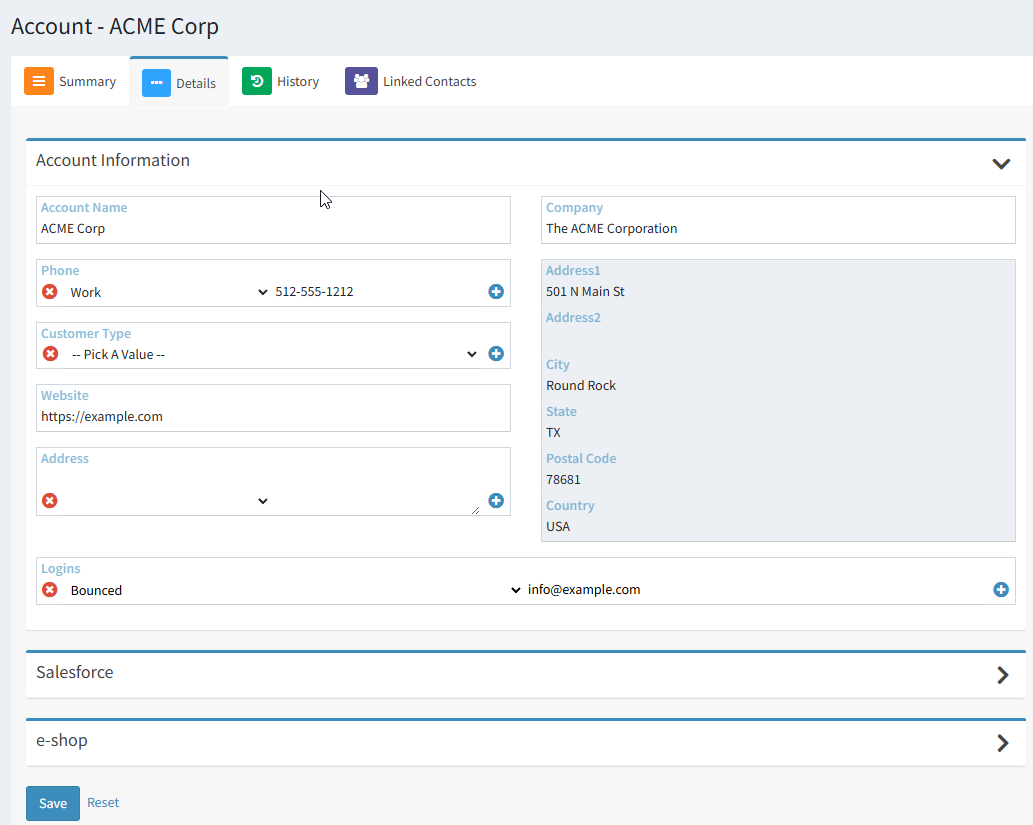
Account Information and Custom Properties – The primary purpose of this page is to view and update account property values for the selected account. Every iService tenant has standard properties for account information, such as account name, phone numbers, email address, etc. The standard account information can be viewed by all agents.
In this example, there are two additional segments defined that have additional account properties. The Salesforce segment appears whenever direct integration to Salesforce is configured, and account properties are mapped for sync. The e-shop properties are defined for a segment in the tenant named e-shop. Agents will see all properties within segments to which they have been granted Segment Access by their administrator. They will also see any properties from other segments that were designated as shared by the administrator.
For properties that allow multiple values (e.g., phone number), you can remove a field by clicking the delete button. To add another value, click the + button.
 You can collapse any of the sections on this page using the expand/collapse accordion button in the heading of the section.
You must save your changes before exiting the page using the Save button on the bottom of the screen.
