iService uses an AI-based semantic search algorithm so you can ask your questions in natural language. iService locates the most relevant articles based on AI embeddings and a cosine similarity search.
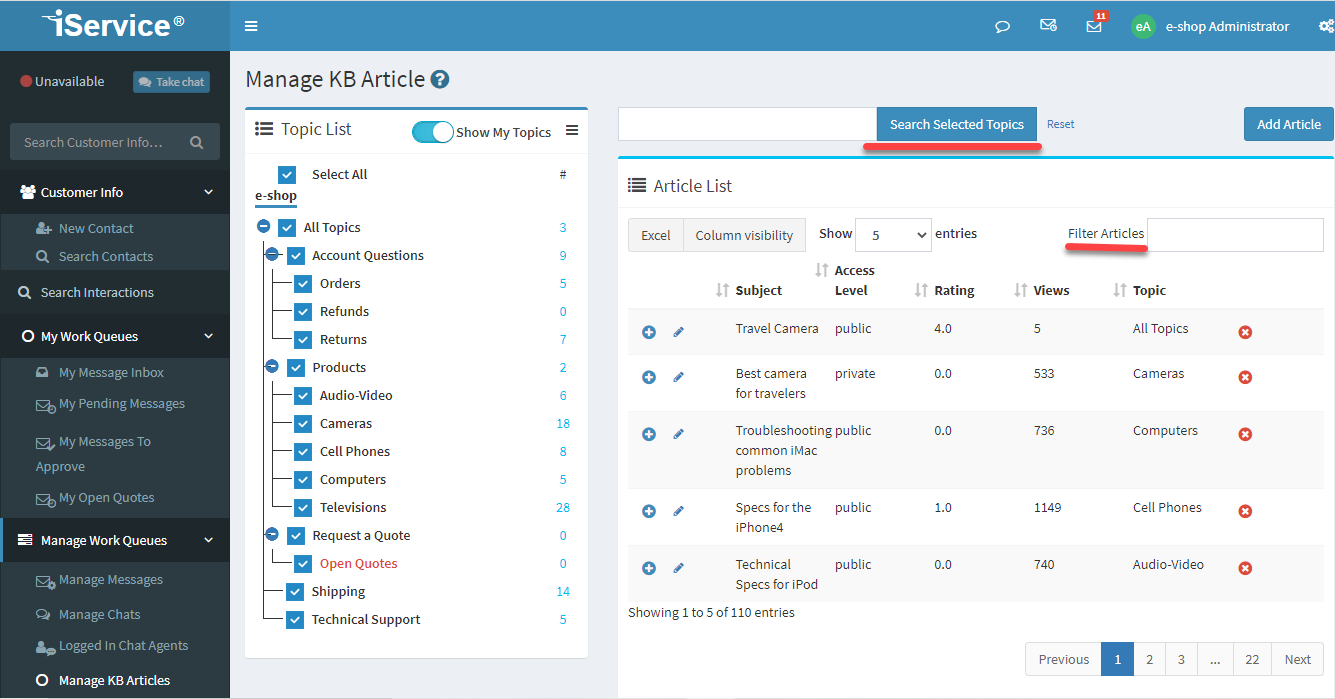
Use the search bar on top of the Manage KB Articles page to find articles. You can search the entire knowledge base, or limit your results based the topics selected. Matching articles are displayed within the Articles List. You can filter the article list using the filter box at the top of the list. As you type into the filter box, only matching articles are displayed.
You can extend the view of your knowledge base by adding custom knowledge base interaction properties. These properties allow you to view articles across any branch of the topic tree.
For example, consider a knowledge base that is organized around these topics:
1.Consumer Issues
2.Merchant Issues
3.Bank Issues
You might have relevant content for each audience within these topics. But, what if you need to classify that same content based on the stage of on-boarding such as Phase 1, Phase 2, and Phase 3? In this example, the content for all three topics could be viewed by the phase description. Instead of making subtopics for the phases, you can create a KB property named Phase that has value options of Phase 1, Phase 2, and Phase 3. Then you can associated that value with any article regardless of the audience. By sorting or filtering on that property, you could see all the Phase 1 issues regardless of their topic.
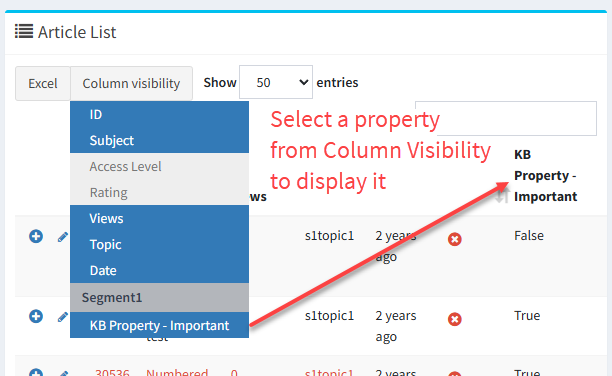
To display KB property values, use the Column Visability button to choose the properties to display.
 Displaying KB Properties in Columns